Texas State University
 
J C Kellam Building, Suite 582
601 University Drive
San Marcos, TX 78666
Ph: (512) 245-2543
Fax: (512) 245-9292
payroll@txstate.edu
adjust type sizemake font smallermake font largerreset font size

Direct Deposit


Fast - Safe - Convenient 

Texas State University-San Marcos Payroll Office is pleased to offer direct deposit of payroll checks to our employees.

  • Direct deposit gives you same-day access to your money on payday
  • Your money is transferred electronically to your secure bank account automatically.  Never worry about lost, delayed or stolen paychecks again.
  • Save time and money: no more trips to the Cashiers Office to find a parking space, pick up your paycheck then to the bank to deposit it.
  • Easily view & print your pay statement via the web through the SAP portal.
  • Access to free checking, free online banking and free bill pay at many local financial institutions.                                                                                                                                                                                                                                          (Sign me up!)
  Student holding up arms and diploma in celebration at graduation    Old Main with trees in foreground and blue sky in background    Driver and go-cart in annual soapbox derby    Three Tx State ROTC members in fatigues      

Online Sign-up Instructions

The SAP Portal enables you to review and update your information in the Human Resource database:

1. Visit the SAP login site at https://ibis.txstate.edu.

2. Log in using your SAP User Name and Password.  (For assistance with your SAP User Name and Password, please contact SAP Security at sapsecurity@txstate.edu.)

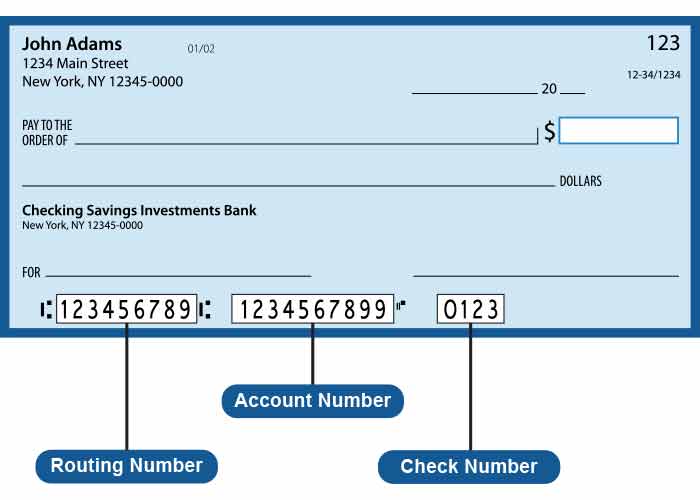
3. Click on the ‘My Bank’ tab to access the system which will enable you to enter or change your bank information.  You will need your bank account number and your bank 's ABA routing number (usually a 9-digit number located at the bottom of your check or deposit slip).

4. To direct your paycheck to a savings account, please contact your bank or credit union for their specific transit number.

5.  If you close your bank account and need to update your banking information, please go online to the SAP Portal and click on the ‘My Bank' tab, or complete a new paper form in the Payroll Office located in the JCK Building, Room 582.

6.  To un-enroll in the direct deposit program please contact the Payroll Office for additional information at (512) 245-2543 or payroll@txstate.edu.
_ _ _ _ _ _ _ _ _ _ _ _ _ _ _ _ _ _ _ _ _ _ _ _ _ _ _ _ _ _ _ _ _ _ _ _ _ _ _ _ _ _ _ _ _ _ _ _ _ _ _ _ _ _ _ _

Paper Sign-up Instructions

1. Complete the Direct Deposit Enrollment Form.

2. For checking accounts, attach a copy or an original voided check from your account. For savings accounts, be sure to include your ABA routing number and account number where noted on the form.

3. Submit paperwork by fax or in person:

         Enroll By Fax
Fax the completed form and a copy of a check to (512) 245-9292.

         Main Campus Drop Off
The completed form and a copy of a check (if applicable) can be delivered in person to the Payroll Office, JCK Building, Room 582. (You may also fill out enrollment forms in person at this office.)
 

4. To direct your paycheck to a savings account, please contact your bank or credit union for their specific transit number.

5.  If you close your bank account and need to update your banking information, please go online to the SAP Portal and click on the ‘My Bank' tab, or complete a new paper form in the Payroll Office located in the JCK Building, Room 582.

6.  To un-enroll in the direct deposit program please contact the Payroll Office for additional information at (512) 245-2543 or payroll@txstate.edu.

_ _ _ _ _ _ _ _ _ _ _ _ _ _ _ _ _ _ _ _ _ _ _ _ _ _ _ _ _ _ _ _ _ _ _ _ _ _ _ _ _ _ _ _ _ _ _ _ _ _ _ _ _ _ _ _

NOTE: In order to comply with Texas State University System rules, beginning January 1, 2007, all payments from Texas State University-San Marcos will be sent electronically via ACH/direct deposit unless the employee elects in writing to receive payment by check rather than electronically.  This rule covers all full and part-time employees.  If an employee chooses to decline enrollment in this program, they would need to complete the required paperwork in the Payroll Office located in JCK 582.  All bank processing will be encrypted for security and safety of information.